MekFab support
MekFab is a design bureau for tabletop giant-robot combat, for iPad, iPhone and Android. It opens MegaMek unit files (MTF and BLK), checks them against the construction rules, computes Battle Value and cost the way MegaMek does, writes technical readouts and record sheets, runs a play sheet at the table, builds tables of organization from a lance to a regiment, and plots jump routes on a starchart of 3,174 systems.
Write to rlandrigan@gmail.com with "MekFab" in the subject. Say which device and iOS version you are on, what you did, and what you expected. If a unit file is involved, attach it; MekFab never sends your files anywhere, so we cannot see them otherwise.
Get the app
Android: distributed from this site. Download and install instructions.
iPad and iPhone: coming to the App Store.
Both ship with the TriStar catalog, and both open any unit file from the MegaMek files page or from MegaMek itself.
Getting started
The first screen asks who is at the terminal. It is not a sign-in: there is no account and nothing leaves the device. Choose TriStar Interstellar employee for the full engineering net, or External client for the client edition, which has the same rules and tools with your own organization and home system on the chart. You can run the setup again at any time from Settings.
A sample catalog is built in, so every feature works before you add a file of your own. Tap a chassis in the catalog, then a variant, to open its dossier.
Your own files
Which files does MekFab read?
MegaMek's MTF files for 'Meks and BLK files for combat vehicles, aerospace fighters and large craft. Files from MegaMekLab and the MegaMek unit archive open as they are.
How do I add more unit files?
MekFab opens any MegaMek unit file. In MegaMek or MegaMekLab they are in data/mekfiles; the MegaMek project also publishes them at github.com/MegaMek/mm-data. On iPad and iPhone, put them in a folder in iCloud Drive or On My iPad and use Open folder…. On Android, tap Add unit files and pick files or a zip.
How do I open a folder?
Tap Open folder… above the catalog and choose a folder in iCloud Drive or On My iPad. MekFab keeps a bookmark to that folder and reads it again on the next launch. Saves go straight back to the same files, so other tools see the changes.
Why is a unit read-only?
Fighters and large craft can be reviewed and documented but not yet edited. A file MekFab could not fully parse also opens read-only, and the Review tab says what it found. Send us the file and we will look.
Why don't my numbers match MegaMek?
They should: Battle Value, cost and weights are checked against MegaMek's own calculators for every unit in the sample catalog. If a design of yours differs, it is a bug on our side. Send the file and both numbers.
At the table
Field Sheet
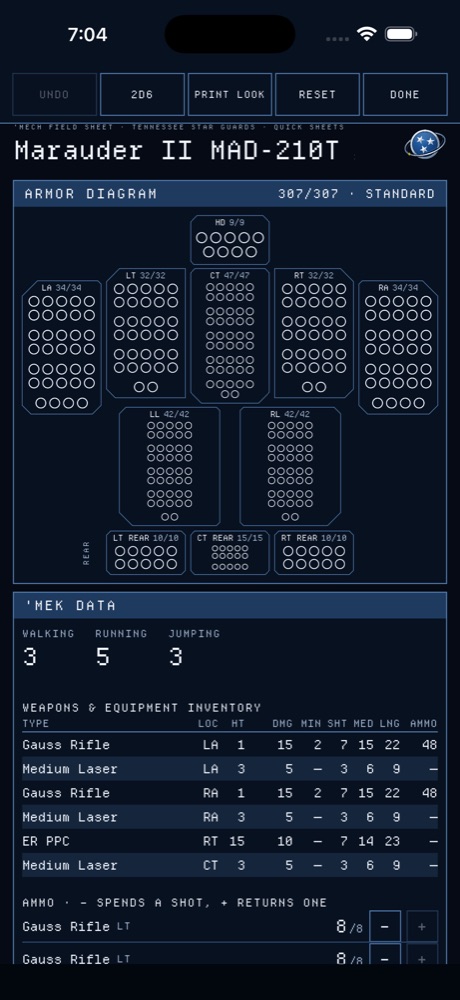
Open a dossier and tap Field Sheet. Tap armor and structure pips to mark damage, tap a critical slot to mark a hit, use the heat scale and the ammo counters, and roll 2D6 from the bar. Sorties stay on file until you clear them. On the phone the sheet is one column with the armor diagram full width; the tablet shows the whole sheet.
Record sheets and readouts
Record Sheet exports a PDF you can print or share. The Readout tab shows the technical readout, with Copy as text for pasting elsewhere.
Forces and the chart
TO&E
Tap TO&E in the header. Start a lance, company, battalion or regiment, or a Clan Star through Galaxy, or use the product regiment template. Units go only in lances and platoons; drag formations and units on the chart to reorganize. The Lift page compares the DropShip bays a force needs with the bays it has.
NAV-OPS
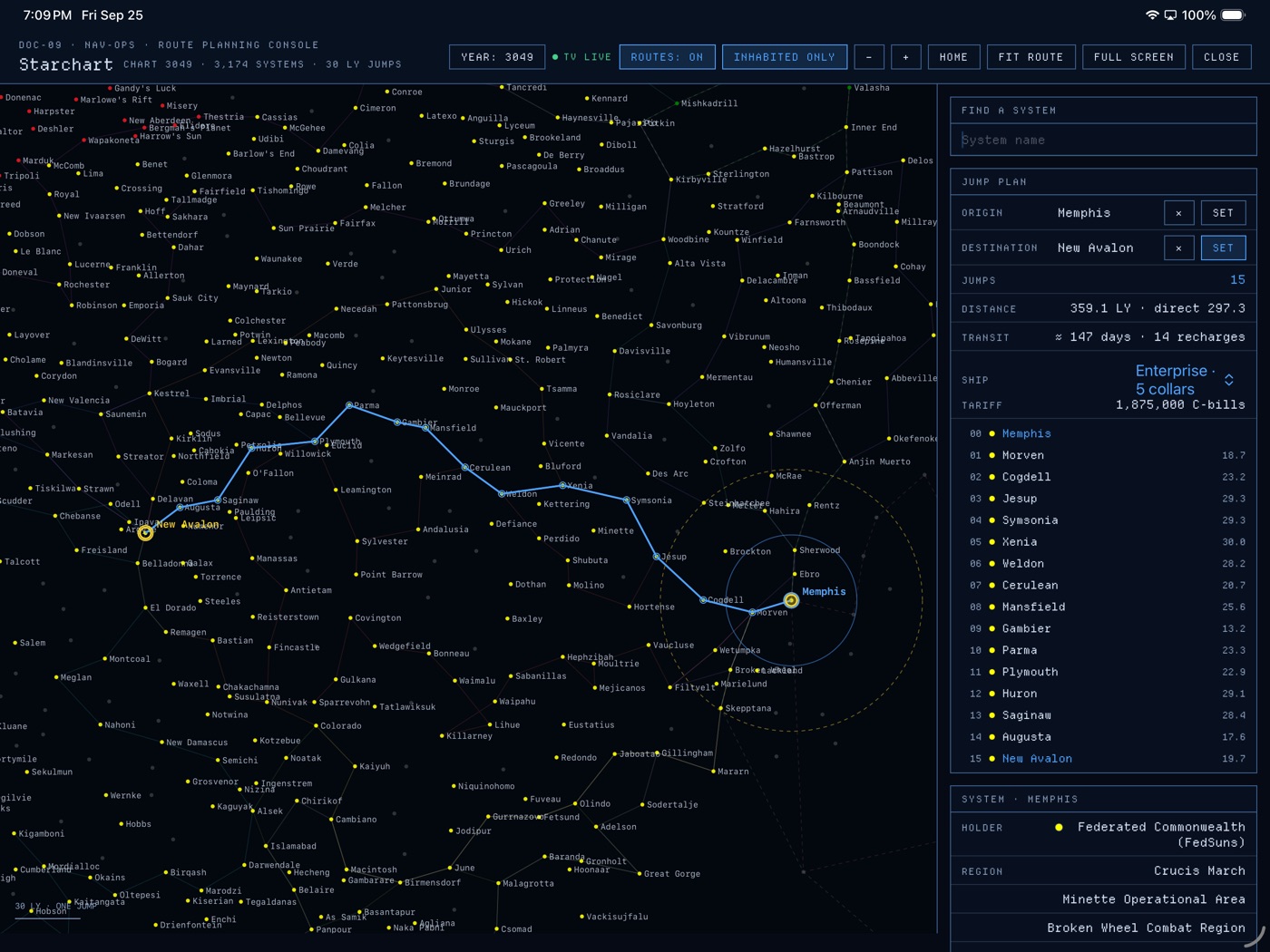
Tap NAV in the header. Search a system or tap it on the chart, then set it as origin or destination; routes are plotted in 30 light-year jumps with transit days and recharges. Pinch to zoom, or use the − and + buttons. The Year menu redraws the chart for another year.
A connected TV
With a display connected by AirPlay or cable, MekFab shows a standby screen on it, then the starchart, the org chart or the unit readout as those screens open on the device. Nothing extra to set up.
Settings
- Appearance: Console (dark), Daylight (light) or follow the device.
- Typeface: Terminal (monospace) or Standard.
- Campaign year and Helm Core year: drive which equipment counts as available in the Review.
- Run the terminal setup again: change the name, edition, organization or home system.
Privacy
MekFab collects no data and makes no network requests of its own. The full policy is at tristar.eclectek.com/mekfab/privacy.
Credits and trademarks
MekFab reads MegaMek's open file formats and implements the construction rules MegaMek implements. MegaMek is free software from the MegaMek team. MekFab is not affiliated with Topps, Catalyst Game Labs, Microsoft or the MegaMek project. BattleTech, MechWarrior, BattleMech and 'Mech are trademarks of The Topps Company, Inc. Departure Mono and Exo 2 are used under the SIL Open Font License.